This is a 2025 follow-up to my post last year about my consumer technology setup. As with last year, this is inspired by Jon Seager’s blog on how he computers!
Hardware
Computers
Since 2020, I haven’t had a desktop computer. This setup has proved even more useful this year than before, since I’ve been travelling and flying much more than I have in the past. It’s great to have a thin and light laptop that I can work on for 8+ hours without plugging in.
Back when I was refreshing my setup in 2020, I was on the fence about getting a desktop. Ultimately, the deciding factor was that I anticipated needing to move across the United States for college in 2022, which would make it impractical to have a desktop computer. This ultimately turned out to be true, so now I have two laptops: one for general productivity/travel/school, and one for gaming/more intensive stuff. It’s probably not the most economical solution, but this setup has satisfied my needs for the last 4 years. And as a bonus, it’s super easy to move my setup between Detroit (home) and Los Angeles (school and work).
Productivity Laptop
My HP Dragonfly G4 remains my go-to laptop to bring to class, to the airport, etc. It has these specs, which I haven’t touched:
- CPU: Intel Core i7-1355U
- RAM: 32GB DDR5-4800
- Disk: 1TB SK Hynix NVMe SSD
- Display: 13.5″ 16:10 1200p LCD touchscreen
- I still don’t use any external display, camera, dock, speakers, mic, etc. with my laptop.
I remain very happy with this laptop, especially the excellent keyboard and build quality. However, I’m starting to notice some physical signs of age – for instance, I’m seeing major paint scratching on the corners and edges. Also, it looks like Windows 11 25H2 has introduced issues on this laptop, including some type of network driver issue that causes the wifi adapter to occasionally disappear. I haven’t gotten to the bottom of this yet. But in the end, I don’t feel any problems are serious enough to warrant upgrading right now.
Gaming Laptop
I still have an 2020 ASUS Zephyrus G14 specced as follows:
- CPU: AMD Ryzen 4900HS
- RAM: 16GB DDR4-3200
- GPU: RTX 2060 Max-Q (6GB version)
- Disk: 1TB WD SSD
- Display: 14″ 16:9 120Hz 1080p LCD
I used to keep this laptop powered on most of the time for gaming and remote access, but I’m finding that the time I want to devote to gaming, compared to other activities, has steadily dwindled over time. Now, this computer typically sits powered off and unplugged in my closet. I wouldn’t be surprised if I choose to donate or recycle this laptop by the end of next year.
Mobile Devices
I’m happy that I’ve upgraded from an iPhone 12 mini to an iPhone 16 Pro. The convenience of iMessage and FaceTime are still very important to me, and I’m generally satisfied with the iPhone as a product, though this has decreased a little bit with the iOS 26 release. The biggest thing I love about this upgrade is the significantly improved battery life compared to my ancient iPhone 12 mini. Having a 120Hz display and much better cameras are a nice touch, too. I continue to pair my iPhone with AirPods Pro 2nd Gen.
I have some concerns about the reliability of this newer iPhone. In November 2025 (when my iPhone 16 Pro was only 8 months old!), my phone display went completely black after plugging it into a charger. I wasn’t able to revive it with a different charger and observed that the phone stopped drawing power at all from any charger, which was an obvious sign of Logic Board failure. The fact that this happened right before I boarded an 11-hour flight only made it worse! I ended up having the iPhone fully replaced by the Apple Store under warranty.
This year, I also upgraded my Android device to a Pixel 10 Pro. I wasn’t originally planning to replace my previous Pixel 6a after selling it a while ago, but a Mint Mobile carrier deal putting the 10 Pro at less than $400 new including a year of cell service was too hard to pass up. I love the design and build of this newer Pixel. The frosted back glass feels super premium compared to the glossy material used in the base Pixel 9 and Pixel 10. I’ve also enjoyed all the Pixel AI smarts which my iPhone still hasn’t caught up to. Gemini Live, Super Pro Res Zoom, and Pixel Screenshots are some of the “smart” features I like about the Pixel.
Once this phone becomes carrier-unlocked, I would definitely consider using it as my daily driver. Google seems to have fixed the cellular issues that plagued the Pixel 6 lineup, which was the main thing holding me back from using a Pixel as my daily driver last year. And I now host a BlueBubbles server in a virtual machine which means I can get FaceTime and iMessage on my Android and Windows devices.
I still typically keep an iPad mini 6th Gen in my backpack. I used to use my iPad for books in Google Play Books or catching up on my emails, but I’ve mostly switched both of these tasks over to my phone or laptop. I need to find a new use for this iPad!
Others
I continue to wear a Garmin Venu 2 smartwatch. This year my ninth as a smartwatch user, and I still believe that I couldn’t return to a normal watch. The product frankly hasn’t improved much (if at all) since I first bought it a few years ago, but the functionality remains adequate for my use. Plus, the new features introduced on the Venu 3 launched this year aren’t compelling enough to get me to upgrade. Finally, Garmin’s customer support remains on top: they replaced my watch for free (!) after I started having issues with it dying quickly in the cold, presumably due to battery aging.
I jumped on the trend and picked up an Oura Ring 4 in August. What I like about the Oura Ring compared to my Garmin watch is that it shows me trends rather than raw data. This information is more actionable than the flood of metrics that Garmin returns. The Oura app is also much better than Garmin Connect; I like being able to input what’s going on in my life (travel, alcohol, etc.) and have the app correlate it to health outcomes. Lastly, I’ve found that the sleep tracking on the ring is much better, and – I think – more accurate than my watch.
I still use a Raspberry Pi 4B 8GB. Earlier this year I rescued it from its idling, purchased a simple software defined radio, and turned it into an at-home ADS-B receiver! Now I can see all the planes that pass over my apartment building, and as a bonus, I get the pro versions of FlightRadar24 and FlightAware for free.
Lastly, my Logitech K380 keyboard and Logitech MX Triathlon mouse continue to go strong, even after ~7 years.
Connectivity & Security
Tailscale remains my mesh VPN of choice. Their technology is as good as ever and the pricing hasn’t changed; I see no reason to leave. And I continue to use Cloudflare Zero Trust Gateway combined with my custom script for DNS-based adblocking on all my devices. This has proven increasingly useful as Android has followed the iOS way and made it much more difficult recently to use non-VPN based adblock software.
I’m still using 1Password to store my passwords and sensitive information. Their apps just work on every platform, plus 1Password hasn’t suffered from security and privacy incidents that many other password manager services have. For FIDO2 and WebAuthn, I have two YubiKey 5 keys, and I also use Windows Hello. Termius remains my SSH client of choice, so I use the built-in vault to store things like my SSH keys and sudo passwords. Finally, Parsec and RDP stay my solutions of choice when I need to remotely access any of my non-server computers.
Productivity
I’m still paying for Google Workspace for my personal domains. Despite the price increases, I feel the feature set is compelling enough that I don’t mind paying $12/month for this, and I think I’ll still renew at the new $14/month rate once my contract expires next year.
I love Todoist and I continue using it to track everything I need to do and to remember in my life. I wasn’t very happy when they proposed increasing my price from $36/year to $60/year in November, but they ended up letting me remain on a “Pro Legacy” plan for $36/year. The caveat is I don’t get any new feature improvements, but I frankly don’t care very much about their new “AI” features; I’d rather save the $24/year.
I’m still on Google Calendar (and Notion Calendar as a desktop client) to schedule things that require blocks of time, and to collaborate with other people. All of my photos remain backed up to Google Photos, while my files are synced using DriveFS to Google Drive.
I don’t take notes very much anymore, but most of my notes are still in Confluence Cloud. There have been some notable feature and speed improvements in the last few months that I like, and the sharing functionality (including publishing as a webpage) works as well as ever. For office applications, I use Microsoft Office, especially Excel, Word, and PowerPoint. Although their collaboration features still lag behind Google Workspace, Office desktop apps just feel smoother to use and have a more powerful feature set (e.g., better integration with my citation manager, Zotero). And, the Google Drive integration in Office desktop apps is pretty solid at this point, so I don’t need to bother with OneDrive.
In terms of synchronous collaboration apps, I honestly haven’t found anything that I really like. I tolerate mainly using iMessage, Signal, WhatsApp, Telegram, Discord, Slack, Microsoft Teams, and Zoom. This is mostly shaped by my employer’s choices.
My browser of choice is still Google Chrome. I’ve started running into issues with Google being increasingly aggressive about restricting Manifest v1 extensions that I rely on such as uBlock Origin, so I’ll be looking for alternatives once Manifest v1 is fully removed. For now, the cross-device sync features, vast extensions library, and flag to bypass the Manifest v1 restrictions keep me with Chrome.
Development
This past year, I’ve spent significantly less time developing than in 2024. Because of the better integration with AI tools – GitHub Copilot is my tool of choice – almost all of my dev time is now in Visual Studio Code.
GitPod, my previous cloud development environment of choice, essentially shut down this year. They decided to turn into some “AI software engineer” product 🤷 I’ve replaced it with GitHub Codespaces which is basically the same thing but included with my GitHub Pro plan. I also really like GitHub Copilot Agent, which seems to be good for automating simple patches and changes. I can just feed it a task in text form and it’ll return a good pull request within a few minutes.
Windows Terminal is still my terminal emulator of choice. I’ve moved all of my hosting needs from a mix of Netlify, Cloudflare, and Azure to Cloudflare Developer Platform and my own private cloud – more on that later!
OS
Nothing has changed about my OS usage from last year:
For four years, I was a full-time Linux user, bouncing between Ubuntu, elementaryOS, Pop!OS, and a few other distros, but now I use Windows 10 and Windows 11. (I’d have everything on Windows 10, but my HP Dragonfly’s Intel hybrid CPU doesn’t seem to play super well with Windows 10.) One big part of this shift is that Windows Subsystem for Linux has actually become pretty good. In my view, it works well enough at this point that I don’t feel compelled to dual-boot a Linux distribution anymore. I’m most familiar with Ubuntu Linux, so naturally it’s my WSL distro of choice.
I don’t care about customizing my desktop that much, so I don’t really mess around with skins, Wallpaper Engine, or anything like that. The most customization I’ve done is moving my taskbar to the right and installing StartAllBack on my Windows 11 machine to restore the Windows 10-style taskbar. I also enjoy using Flow Launcher as a Spotlight-esque universal launcher that doesn’t disrupt my flow (no pun intended) as I’m working.
AI
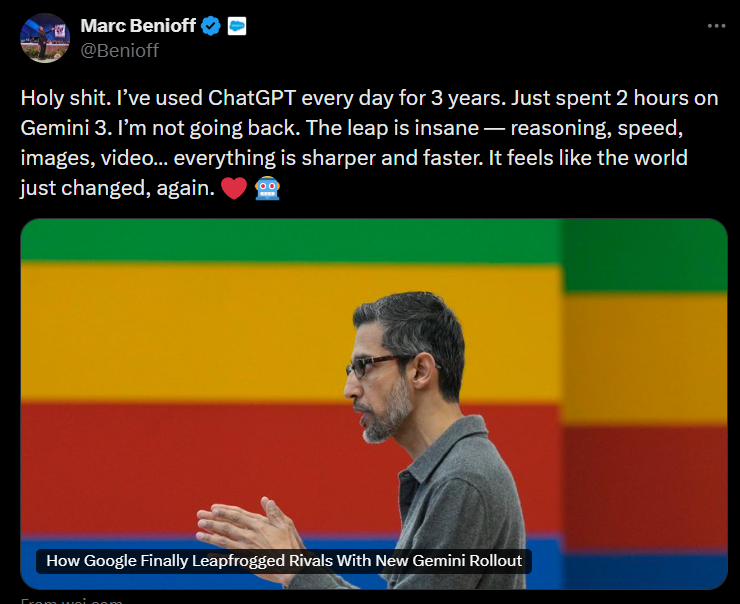
A new category this year! I’ve been very impressed by how far AI has come this year. As is the case for many people, AI has become a part of my daily toolkit. I have access to Google’s AI Pro plan through my Google Workspace subscription, so I use Gemini a lot. I think Gemini has come really far since it first launched (remember Bard?); it’s just as good – if not better – than any other LLM on the market today. I mostly use Gemini for deep research and programming questions. The deep integration with Google services, especially Gmail, is useful to me as well.
Servers
Compared to last year, I’ve slimmed down my server collection a lot. I still have quite a few virtual machines idling around the world, but almost everything (serious) I host runs on a private cloud built on Proxmox and a couple of dedicated servers I have on the East coast. Here are some of the things I’m running:
- Grist, spreadsheet software that’s a cross of Airtable and Google Sheets. It has all the relational database features I need, while including spreadsheet features like conditional formatting. It also has a nice RESTful API, which I use for automations via N8N.
- Keycloak, which handles SAML and OAuth based single sign on along with MFA for many of these other self-hosted applications.
- Paperless-ngx, which allows me to easily scan all of the paper documents I receive into a full-text indexed, searchable database. It’s reduced the clutter on my desk so much.
- Actual Budget, a super snappy, offline-first budgeting app (it’s envelope based like You Need a Budget). This has helped me gain more visibility and accountability into my day-to-day spending.
- Remnawave, an integrated multi-server control plane for V2ray proxy servers. This makes it easy to sync configurations and authentication across multiple endpoints.
- Content management systems for my various websites – WordPress and Directus.
I still run everything in Docker containers, orchestrated with Docker Compose and Coolify. Rather than backing up at the OS level, I now run frequent VM-level backups to my own Proxmox Backup Server.
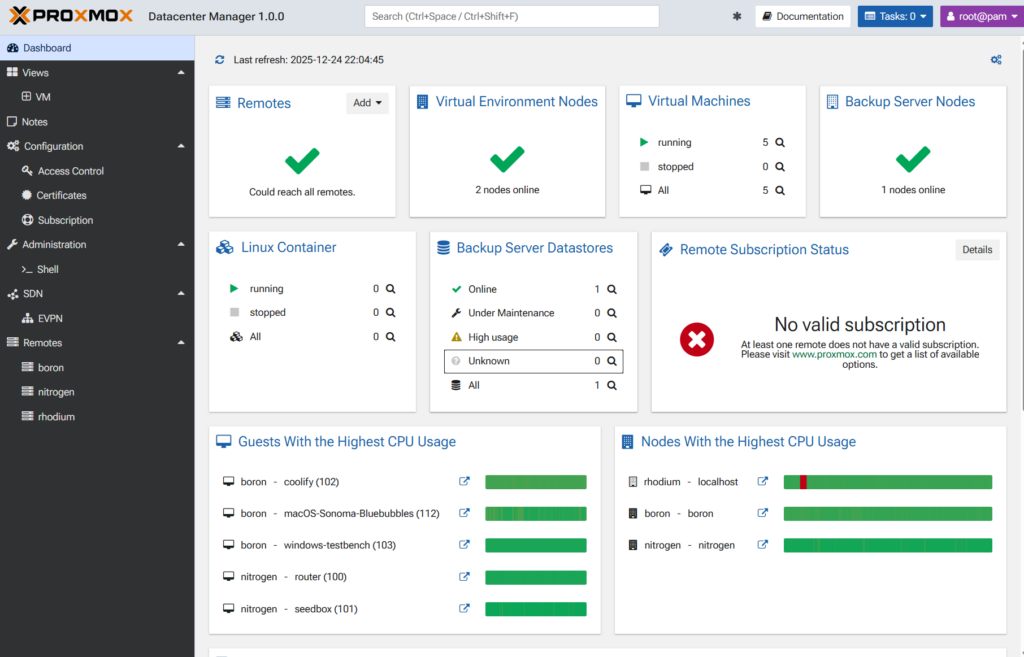
Lastly, perhaps the best new thing I’m hosting this year is Proxmox Datacenter Manager. It consolidates multiple Proxmox clusters and Proxmox Backup Servers into one control plane. This is something I’ve been wanting for a long time and I’m really happy with how the Proxmox team has built this. Right now, it’s a good way to view (read) the status of my infrastructure; I’m hoping the new year will bring better write capabilities to Datacenter Manager.